
How to log in to BN88
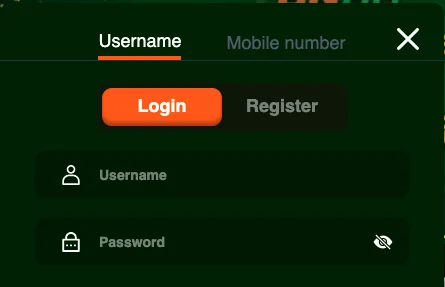
Select Login in the top-right corner. The sign-in window has two tabs at the top, Username and Mobile number, plus a Google button.
Log in with username and password
- Stay on the Username tab.
- Enter your username and password. The eye icon shows the password so you can check it.
- Tick Remember only on your own device.
- Select Login.
Log in with your mobile number (SMS code)
This only works once your mobile number is verified on your account. If you registered with a username and haven't verified a number yet, log in with your username first and verify it in your profile.
- Open the Mobile number tab. The country code is set to +880 for Bangladesh.
- Enter your verified mobile number and select Get code.
- Type the code from the SMS into the SMS field and select Login.
It's worth verifying your number early anyway: most BN88 promotions, and deposits, require it.
Log in with Google
Under "Or log in with", the Google button signs you in with your Google account instead of a password.
One sign-in covers everything: sports, casino, VIP, rewards and payments. In Bangla it's লগইন: the same account and the same screen.
New to BN88? Register first
- Select Register next to the Login button.
- Choose a username. It is what you will log in with, so pick one you'll remember.
- Enter a password and type it again in Confirm password.
- Tick I am 18 years old and agree to accept Terms and Services.
- Select Register. You can also register with the Google button instead.
After registering, verify your mobile number and email in your profile. Verification unlocks mobile-number login and is required for bonuses such as the ৳500 Sign Up Bonus, which must be claimed within 24 hours of signing up.
BN88 VIP login
There is no separate VIP account. VIP members sign in with the same details as everyone else, and their VIP status shows in the VIP section once they are logged in.
Many searches for BN88 VIP login come from the bn88.vip web address. Only enter your password on an address you trust, and if in doubt ask customer support which addresses are official.
Logging in on mobile and the app
On a phone you can sign in through the BN88 app or the mobile site with the same details. Your account, balance, rewards and VIP status are the same on every device, so you can start on one and continue on another.
Login problems and password help
- Wrong password message: check for typing errors and caps lock, then try again.
- Forgotten password: select Forgot Password on the login screen. If your mobile number is verified, you can also sign in with an SMS code from the Mobile number tab, with no password needed.
- Mobile number login doesn't work: the number probably isn't verified on your account yet. Log in with your username and verify it in your profile, then try again.
- SMS code not arriving: check the number after +880, wait a minute before requesting another code, and make sure the number is the one verified on your account.
- Page will not load: refresh, try another browser or switch between the app and the website.
- Still locked out: open Live Chat Support and explain what happens when you try to sign in.
Keep your account safe
Never share your password, not even with someone who says they work for BN88. Support staff do not need it to help you. Sign in only through the Login button on the site or app, not through links sent in messages, and log out on shared devices.